
In June of 2025, I bought a Jackery Explorer 2000 v2. Finding specifications for it has been a pain — I think Jackery makes them difficult to discover because they want you to buy their accessories.
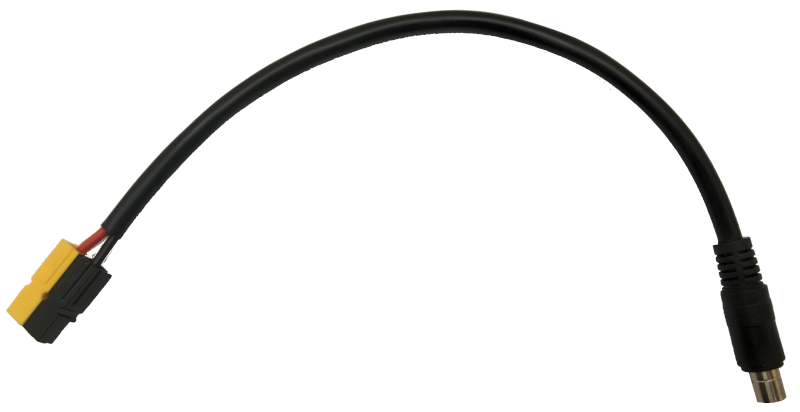
But I already had a couple of 100 W panels that had Anderson Powerpoles on them so I needed to build a few cables. Here’s the result:
Specifications
- Solar panel input connector: DC8020.
- Connector polarity: center positive.
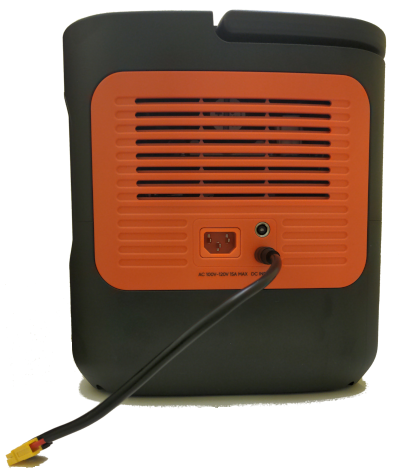
- Voltage: 11.0–60 V DC. According to the manual, if you’re below 16 V you’ll get 8 A maximum no matter how many panels you have plugged in; if you’re over 16 V you’ll get up to 12 A with one panel and 21 A with two panels.
- MPPT: one.
Undocumented Button Presses
- Soft reset? With the power turned on, hold Power and DC/USB simultaneously for 3 seconds. Resets WiFi and Bluetooth.
- Another soft reset Hold Power for 10 seconds?
- Hard reset? Hold Power and DC/USB for 13 seconds. Enters BMS recalibration mode? (Discharge to 0%, then charge back to 100%)?
- Switch AC frequency Hold AC for 3 seconds to switch between 50 Hz and 60 Hz power. (Difference between EU and US models?)
Error Codes
Most of these and their solutions are from an troubleshooting article about the E2000, the Explorer 2000 Pro manual, and the European Jackery Helpcenter.
| Code | Meaning | What to do |
|---|---|---|
| F0 | BMS communications error | |
| F1 | inverter communications error | |
| F2 | charging module communication error | Try unplugging/replugging 8 mm charging cables? |
| F3 | battery failure | |
| F4 | battery overvoltage | |
| F5 | battery undervoltage | |
| F6 | inverter error | Load power more than that of the power supply? Unplug the load and reset the Jackery. Could also be internal hardware failure if a reset doesn’t fix it. |
| F7 | power supply module error | |
| F8 | battery overcurrent/short | Unplug everything (all charging and load cables). |
| F9 | DC output overcurrent/short | Unplug all the load cables. |
| FA | power mismatch? | Happens when two Jackerys are ganged and one is 60 Hz while the other is 50 Hz. Possibly not applicable to the 2000 v2. |
| FB | ||
| FC | ||
| FD | ||
| FE |
Comments
- The DC8020 is an 8 mm outer diameter connector with a 2 mm center pin. I used the GINTOOYUN pigtail from Amazon which helpfully provides two cables.
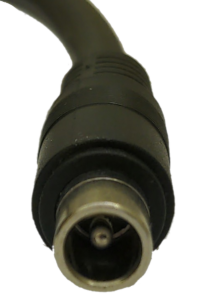
- Avoid the 7909 connector, which looks similar but is 7.9 mm and the pin is smaller (0.9 mm).
- Even if you ordered a DC8020 connector, measure the pin. I’d first ordered from a different manufacturer and they shipped a DC7909. It will still plug in (7.9 mm is almost 8 mm), but the pin won’t make contact.
- Half the vendors on Amazon think the 7909 is the “Jackery connector” while the other half think the 8020 is. They’re both half right.
- Both 8 mm jacks are connected to the single MPPT controller in the Jackery. The 12 A maximum is a limit of the connector. This also means you’ll need balanced voltages on two panels if you connect each one into an 8 mm connector. Alternately, you can plug them in series as long as you’re under 60 V total, and then can connect to both connectors using a Y cable.
Frequently Asked Questions
Q: My panel isn’t charging the battery. Why not?
A: Any of a number of reasons:
- Make sure you’ve got a DC8020 connector (“thick pin”) and not a DC7909. The pin size should be 2 mm (about 5/64") and not 0.9 mm (about 9/256").
- Verify you’re getting at least 11 V from the panel.
- Verify you’re not getting more than 60 V from the panel.
- Make sure the power to the Jackery is turned on.
- Make sure the DC8020 is pushed all the way in. It takes some force to do this, and you might bend the plastic shell of the Jackery a little. Be careful not to snap it.
- Make sure you’re not in battery saver mode if your charge is already near 85%. I discovered that if you are at 84%, the solar panel won’t charge the battery in battery saver mode.
- Make sure it’s not colder than 0 C (32 F) or warmer than 45 C (113 F).
- If all else fails, make sure you can still charge from the wall socket.
Q: Is the solar panel connector (DC8020) center positive or center negative?
A: Center positive.
Q: I have an older Jackery and the DC8020 doesn’t fit. Why?
A: Older models used the DC7909. If you have an older Jackery, you’ll need the 0.9 mm “thin pin” connector.
Something wrong? Get in touch with me. My username is andrewmemoryblog (no “s”) on a well-known Google email provider.
Reply by Email