
I spent a lot of time messing around because I thought the runner was the thing that ran my actions. Nope, it’s the thing that runs the Docker image that builds your images. That makes life easier. Here’s how I set up mine:
Get the runner token#
You need the runner token to configure a runner. So do that first. You need to be an admin to set up the runner.
Under the profile menu on the far right, click on “Site administration.”
Under “Admin settings” expand Actions to click on “Runners”
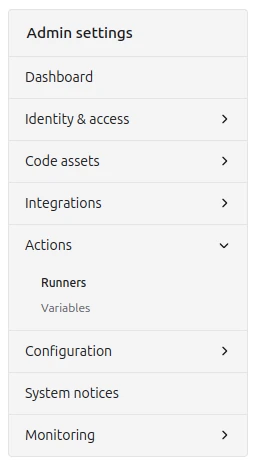
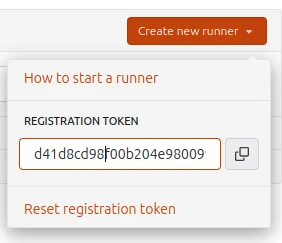
- Over on the right, click the “Create a new runner” button. This opens a dialog with a token in it. Copy that token to a text editor.
Setting up a runner#
I spent a lot of time messing around because I thought the runner was the thing that ran my actions. Nope, it’s the thing that runs the Docker image that builds your images. That makes life easier.
- Make a directory for the runner, put the Dockerfile in it, and grab the image. These instructions look at lot like the ones at the OCI image installation instructions on the Forgejo website.
cd /data/shared/forgejo
mkdir runner
cd runner
wget https://code.forgejo.org/forgejo/runner/raw/branch/main/Dockerfile
docker run --rm data.forgejo.org/forgejo/runner:11 forgejo-runner --version- Create a
setup.shinrunner/that looks like this. (Make sure to update the chown line to use the UID and GID you specified in the Forgejo docker-compose.yaml):
#!/usr/bin/env bash
cd /data/shared/forgejo/runner
set -e

mkdir -p data/.cache
chown -R 2000:2000 data
chmod 775 data/.cache
chmod g+s data/.cache- Edit the Dockerfile to use your user info. Look for the USER line and put in your UID and GID:
USER 2000:2000- Run setup.sh
bash ./setup.sh- Create a docker-compose.yaml. Based on the Forgejo instructions, it should look like this (but remember to change the user: to your UID and GID). Yeah, I know it should be a different UID and GID but I’m lazy:
version: '3.8'

services:
  docker-in-docker:
    image: docker:dind
    container_name: 'docker_dind'
    privileged: 'true'
    command: ['dockerd', '-H', 'tcp://0.0.0.0:2375', '--tls=false']
    restart: 'unless-stopped'

  runner:
    image: 'data.forgejo.org/forgejo/runner:11'
    links:
      - docker-in-docker
    depends_on:
      docker-in-docker:
        condition: service_started
    container_name: 'runner'
    environment:
      DOCKER_HOST: tcp://docker-in-docker:2375
    # User without root privileges, but with access to `./data`.
    user: 2000:2000
    volumes:
      - ./data:/data
    restart: 'unless-stopped'

     command: '/bin/sh -c "while : ; do sleep 1 ; done ;"'
# command: '/bin/sh -c "sleep 5; forgejo-runner daemon --config config.yml"'- Fire up the runner and attach to the shell in the runner image.
docker compose up -d
docker exec -it runner /bin/sh- From within the Docker image shell, run:
forgejo-runner generate-config > config.yml
forgejo-runner register- This will run a script. I used the following values. For the runner labels, what they really want is the label followed by a colon followed by the URL of the docker image, with each entry separated by commas. Since I wanted my runner to run Hugo, I added a label for hugo and a pointer to the Hugo image as well as a “docker” label which is one of the defaults:
INFO Enter the Forgejo instance URL (for example, https://next.forgejo.org/):
http://myforgejoserver.acornwall.net:3000

INFO Enter the runner token:
d41d8cd98f00b204e9800998ecf8427e32d6c11747e037155210

INFO Enter the runner name (if set empty, use hostname: 3b586057879f):
runner

INFO Enter the runner labels, leave blank to use the default labels (comma-separated, for example, ubuntu-20.04:docker://node:20-bookworm,ubuntu-18.04:docker://node:20-bookworm):
hugo:docker://ghcr.io/gohugoio/hugo:v0.152.2,docker:docker://data.forgejo.org/oci/node:20-bullseye
All that creates a
.runnerfile in the Docker image, which gets mapped to thedatadirectory thatsetup.shcreated.Now, shut the image down.
docker compose down- Next, edit the docker-compose.yaml. Comment out the command that just spins, and uncomment the command that does the thing:
...
#   command: '/bin/sh -c "while : ; do sleep 1 ; done ;"'
command: '/bin/sh -c "sleep 5; forgejo-runner daemon --config config.yml"'- Bring the runner back up:
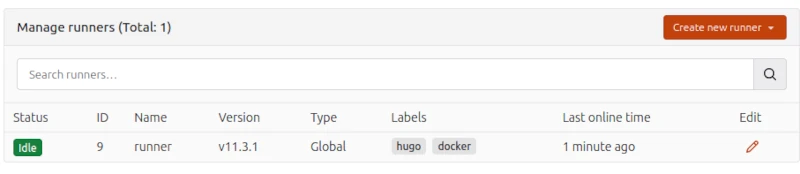
docker compose up -d- If you did everything right, you should see a runner show up under Admin settings - Actions - Runners.
Getting the runner to restart on reboot#
Another bout with systemd, ‘cause we’d like this to start on reboot as well.
[Unit]
Description=Forgejo Runner
After=forgejo.service
Requires=forgejo.service

[Service]
Type=oneshot
RemainAfterExit=yes
ExecStart=/bin/bash -c "/usr/bin/docker compose -f /data/shared/forgejo/runner/docker-compose.yaml up --detach"
ExecStop=/bin/bash -c "/usr/bin/docker compose -f /data/shared/forgejo/runner/docker-compose.yaml down"

[Install]
WantedBy=multi-user.target
And then the requisite:
/usr/bin/docker compose -f /data/shared/forgejo/runner/docker-compose.yaml down
sudo systemctl start forgejo-runner
sudo systemctl status forgejo-runner
sudo systemctl stop forgejo-runner
sudo systemctl enable forgejo-runner
sudo systemctl start forgejo-runner