
I’ve been using Ruckus Unleashed network devices (R610 and R710) and I’ve been pretty happy with them. However, they do have a problem: when the network drops (and Cox does it pretty frequently) it takes a while to reestablish the connection. It’s bad enough that I’ve got a Unify AP running just so I can reconnect.
Making the mesh static#
Part of the problem is that I’m running on a mesh access point, and it’s possible that the mesh is busy reconfiguring itself because of the lack of network. So I decided to lock things down a little — there are some access points that will never change roles unless I move them around or change the underlying hardware.
I’m using firmware 200.15.6.212.27 (the last one before EOL). This documents what I did.
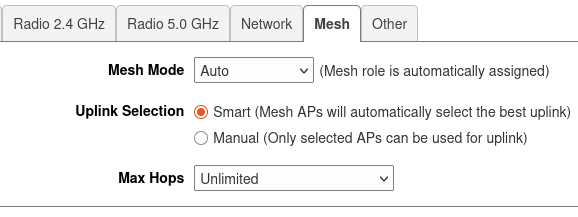
- Log into the Ruckus management screen from a hard-wired port, then click on “Access Points.” For each access point, click on it, then click the “Edit” button and then the “Mesh” tab. This is what things looked like for all the APs before I started messing around:
- My Master AP is plugged into the switch. So I configured it as a Root AP:
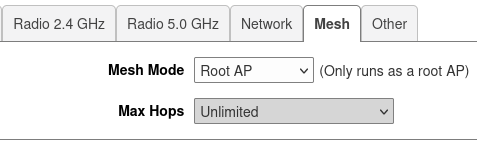
After doing this, I got a dialog: “Warning: Changing Mesh mode will make Master AP reboot to take effect. Are you sure you want to continue?” Time to click “Yes”. Then snooze a bit until the AP is back online. Once it rebooted, I had to log into the Ruckus admin software again. At this point all my other APs were disconnected.
- My Root AP is also plugged into the switch. It gets to be a Root AP as well:
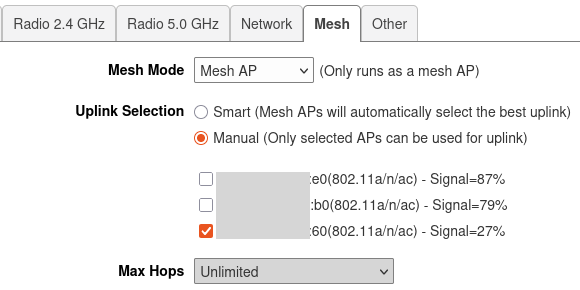
Important: I needed to remember the last two digits of the MAC (:60).
- My (sole) mesh AP is on the other side of the house. For it, I tell it explicitly to run as a Mesh AP and connect to the Root AP (not the Master AP) by MAC address:
As you update each AP, it goes offline and then (eventually) comes back. Don’t panic. Eventually they will all come up and you can edit them one at a time.
This is only a theory#
I haven’t tried taking the network down and testing it. (Cox will do that soon enough…) However, this should prevent needless re-negotiation as devices try to figure out who they are based on connectivity.
Reply by Email